git workflow
When you use Ruby you will encounter an entire ecosystem of tools, most of which are run from the command line. This section gives a brief overview of the most important of these tools.
Ref: WGR Chapter 1. Bootstrapping your Ruby literacy
ruby is the Ruby Interpreterruby hello.rb runs the Ruby source file hello.rb
-w - warnings-v - version or verbose--help-c - check syntaxirb --simple-prompt
or
alias irb="irb --simple-prompt"
or
echo "IRB.conf[:PROMPT_MODE] = :SIMPLE" >> ~/.irbrc
if you're running rvm, do this right now:
rvm docs generate
rdoc generates and displays documentation
gem server launches an rdoc browser locallygem install cheat for command-line tool or see http://cheat.errtheblog.com
$ cheat agile
Agile Manifesto_____________
 - Individuals and interactions over processes and tools
 - Working software over comprehensive documentation
 - Customer collaboration over contract negotiation
 - Responding to change over following a plan
While there is value in the items on the right, we value the items on the left
more.
Rakefile contains many "tasks" which can be run a la rake test
rake --tasks shows all defined tasks in the current Rakefile
rake -T
gem install foo - downloads and installs the "foo" gem from rubygems.orggem, rvm and bundler live in uneasy harmonygem commandfor example, open_gem which opens the source code for a gem in your editor
gem install open_gem
gem open rake
gem install bundler loads it into the current gemsetbundle installbundle updateGemfile lists all the gems for the current project (directory)
Rakefile in scopervm listrvm install 1.9.2rvm use 1.9.2rvm gemset create teachingrvm use 1.9.2@teachinggem and Bundler
Are you on Unix/OSX? Check out Alex's dotfiles repo
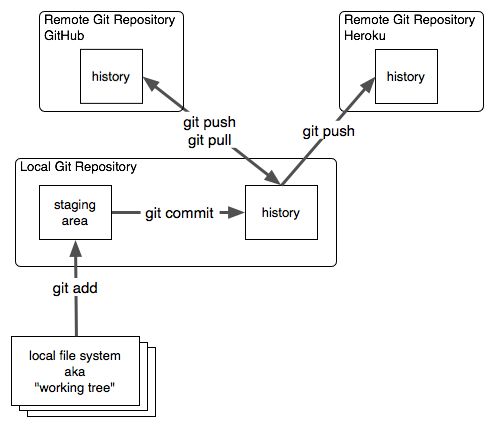
Git is a Distributed Version Control System. It's very popular these days, especially among Ruby developers.
Git allows offline, asynchronous, decentralized development.
GitHub is a web service built on git that also adds issue tracking, automated pull requests and merging, etc.
git init -- create a repo locallygit clone -- copy a repo from a servergit status -- what has changedgit log -- historygit add -- stage files for commit (*local*)git commit -- commit staged files (*remote*)See also nerdgirl's visual git cheatsheet at https://github.com/nerdgirl/git-cheatsheet-visual
Git needs to know who you are, so try this:
git config --global --list
and if it doesn't have your name, do this:
git config --global user.name "Your Name"
git config --global user.email mail@example.com
1/20
